Tuesday, 15 May 2012

Authentication, Authorization and Accounting


Authentication, authorization, and accounting (AAA) is a security architecture for distributed distributed systems, which enables control over which users are allowed access to which services, and how much of the resources they have used.

The process of authentication is based on each user having a unique set of criteria for gaining access. The AAA server compares a user's authentication credentials with other user credentials stored in a database. If the credentials match, the user is granted access to the network. If the credentials are at variance, authentication fails and network access is denied. Examples of types of credentials are passwords, one-time tokens, digital certificates, and phone numbers (calling/called).


After authentication, a user must gain authorization  for doing certain tasks. After logging into a system, for instance, the user may try to issue commands. The authorization process determines whether the user has the authority to issue such commands. Simply put, authorization is the process of enforcing policies: determining what types or qualities of activities, resources, or services a user is permitted. Usually, authorization occurs within the context of authentication. Once you have authenticated a user, they may be authorized for different types of access or activity. Examples of types of service include, but are not limited to: IP address filtering, address assignment, route assignment, quality of Service/differential services, bandwidth control/traffic management, compulsory tunneling to a specific endpoint, and encryption.

The final process is accounting, which measures the resources a user consumes during access. This can include the amount of system time or the amount of data a user has sent and/or received during a session. Accounting is carried out by logging of session statistics and usage information and is used for authorization control, billing, trend analysis, resource utilization, and capacity planning activities.

Reference:
http://searchsecurity.techtarget.com/definition/authentication-authorization-and-accounting
http://en.wikipedia.org/wiki/AAA_protocol

Tuesday, 8 May 2012

Context-based access control

Context-based access control (CBAC) intelligently filters TCP and UDP packets based on application layer protocol session information that are not specifically denied by an ACL and can be used for intranets, extranets and internets. CBAC can be configured to permit specified TCP and UDP traffic through a firewall only when the connection is initiated from within the network needing protection.
With CBAC inspection rules, you can configure alerts and audit trail information on a per-application protocol basis. It generates real-time alerts and audit trails. Audit trails uses system log to track all the networking transaction. It can also mitigate Denial of Service (Dos) and detection which is essential for every computer.
CBAC inspects traffic that travels through the firewall to discover and manage state information for TCP and UDP sessions. This state information is used to create temporary openings in the firewall's access lists to allow return traffic and additional data connections for permissible sessions.


mod7_fig8.png (946×360)

Every computer will have access to network, regarding work, surfing internet and so on. CBAC will check every packets that is in traffic. With CBAC, CBAC can examines the application-layer protocol information to learn about the state of TCP or UDP session. This ensures that our application are not downloading or allowing people to gain access to our computer through these applications.

Access list control


An access control list (ACL) is a table that tells a computer operating system which access rights each user has to a particular system object, such as a file directory or individual file. Each object has a security attribute that identifies its access control list. The list has an entry for each system user with access privileges. The most common privileges include the ability to read a file (or all the files in a directory), to write to the file or files, and to execute the file (if it is an executable file, or program).


Different Operating System (OS) may use different Access Control List. When a user wants to initiate a specific action against a component item (for example, edit an article), the system checks the permission for this combination of user, item, and action. If it is allowed, then the user can proceed. Otherwise, the action is not allowed.

Allow: Allows this action for this level and group and for lower levels and child groups. This does not have any effect if a higher group or level is set to Deny or Allow. If a higher group or level is set to Deny, then this permission will always be denied. If a higher group or level is set to Allow, then this permission will already be allowed.
Deny: Denies this action for this level and group.
Access control list may include networking Access Control List (ACL), filesystem ACL and etc.


Reference:
http://en.wikipedia.org/wiki/Access_control_list
http://searchsoftwarequality.techtarget.com/definition/access-control-list

Sunday, 6 May 2012

Secure Perimeter Routers & Disable Services & Logging

The first line of defense against security threat is usually: Perimeter router, includes configuration of the perimeter. By disabling services and logging, network security can be more secure.
Some services which are rarely used like: CDP, finger, and TCP and UDP can be disable to secure the network even further. Hackers might make use of these service's security issue to try and gain unauthorized access into the network or get the network information.
Event logging is also important for security purpose, to reference is any security issues 'pop' out.
Interface status change, changes to system configuration, access list matches, events detected by the firewall, and intrusion detection features are some things that are log. Most routers are able to save system
logging information to a local RAM buffer.
There are different types of router configuration. Patches & Updates which means we have to stay updated to the latest patch and update. Protocols which means by using ingress and egress filtering, or screen ICMP traffic from internal network to counter protocol level attack. Administrative access which means deciding which interface and ports administration connection is allowed.  Restricting access to the specific interfaces and ports, and encrypting them, having countermeasures against hijacking into these interfaces.

Common Threats to Router and Switch Physical &Mitigation


Basically, there are four common threats which are hardware threats, environmental threats, electrical threats and maintenance threats.
There are a few steps which can be taken for mitigation for hardware threats. The room must be locked with only authorized personnel allowed access. The room should not be accessible via a dropped ceiling, raised floor, window, ductwork, or any point of entry other than the secured access point.
If possible, use electronics access control with all entry attempts logged by security systems and monitored by security personnel. If possible, security personnel should monitor activity via security cameras with automatic recording.
Electrical threats include irregular fluctuations in voltage, such as brownouts and voltage spikes, Electrical threats, such as voltage spikes, insufficient supply voltage (brownouts), unconditioned power (noise), and total power loss can be mitigated by installing uninterruptible power supply (UPS) systems for mission-critical Cisco network devices, installing backup generator systems for mission-critical supplies, plannings for and initiate regular UPS or generator testing and maintenance procedures based on the manufacturer-suggested preventative maintenance schedule, installing redundant power supplies on critical devices, monitoring and alarm power-related parameters at the power supply and device levels.
Environment threats include very low and high temperature, moisture, electrostatic, and magnetic Interference. Threats like this should be mitigated by supplying the room with dependable temperature and humidity control systems. Always verify the recommended the recommended environmental parameters of the Cisco equipment with the supplied product documentation, removing any source of electrostatic and magnetic interference in the room. Equipping remotely monitor and alarm the environment parameters of the room would also ensure mitigation.
Maintenance threats include not having backup parts or components for critical network components, not labeling components and their cabling correctly Maintenance threats including poor handling of key electronic components, electrostatic discharge (ESD), lack of critical spares, poor cabling , poor labeling, and many more. Steps can be taken for mitigation such as label clearly all equipment cabling and secure the cabling to equipment racks to prevent accidental damage, disconnection, or incorrect termination, use cable runs, raceways, or both to traverse rack-to-ceiling or rack-to-rack connections, always follow ESD procedure when replacing or working with internal router and switch device components, maintaining a stock of critical spares for emergency use, logged off administrative interfaces when leaving a station, and use more locks on each door as no room is totally secure. When the intruders are insider secure room, nothing is left to stop them from connecting a terminal to the console port of the Cisco router or switch.

Thursday, 3 May 2012

Network / Port Address Translation


Inside local address (private) - the IP address assigned to a host on the inside network. The address is usually not an IP address assigned by the Network Information Center (NIC) or service provider. This address is likely to be an RFC 1918 private address.
Inside global address (public) - A legitimate IP address assigned by the NIC or service provider that represents one or more inside local IP addresses to the outside world.
Outside local address - The IP address of an outside host as it is known to the hosts in the inside network.
Outside global address - The IP address assigned to a host on the outside network. The owner of the host assigns this address.

Network Address Translation (NAT) is designed for IP address conservation. It enables private IP networks that use unregistered IP addresses to connect to the Internet. NAT operates on a router, usually connecting two networks together, and translates the private (not globally unique) addresses in the internal network into legal addresses, before packets are forwarded to another network.

As part of this capability, NAT can be configured to advertise only one address for the entire network to the outside world. This provides additional security by effectively hiding the entire internal network behind that address. NAT offers the dual functions of security and address conservation and is typically implemented in remote-access environments.
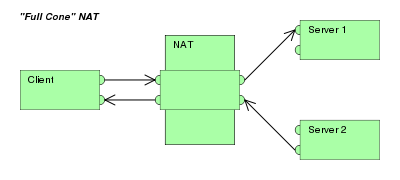
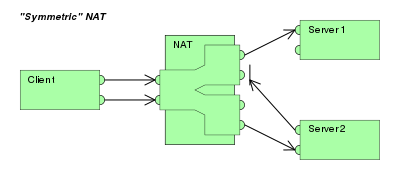
NAT also has different types of methods: Full-cone NAT, Restricted cone NAT, Port-restricted cone NAT and symmetric NAT. Full-cone NAT also known one-to-one NAT.


Port Address Translation (PAT) is also called porting, port overloading, port-level multiplexed NAT and single address NAT. During PAT, each computer on LAN is translated to the same IP address but with a different port assignment. PAT does not work alone. It always works with NAT as PAT only translates port and not the IP address.

Perimeter router, internal router and firewall

Perimeter router is a type of router which is used for the outside network to connect to the internal network.
Internal network is used within the network.
Both do the same things the only exception is that they are used in different topology.
In every router topology, a firewall is needed to secure the network. The firewall allows the user to make certain rule to decide what type of traffic would be allowed in or out of the user's private network. Some firewall can restrict only certain IP address or domain names and some block certain type of traffic by the port they use.
Different organizations use different types of topology in their network.
 For instance, a small business uses a standalone perimeter router topology as it doesn't require a lot of security in it's network. This topology, connects the untrusted network to the company's private network through  perimeter router. 
Another example is the perimeter router with integrated firewall. This is more commonly use in small/medium organizations for a better protection of the network than just only the router protecting the network, and have a better rate of data transfer.
One more example is the perimeter router, internal router and firewall topology. This topology used both the perimeter and internal router. The perimeter router would connect to the firewall which would connect to the internal router which connects the public network to the private network of the organization. Usually large/medium organizations use this topology for greater routing options, better performance and protection.